Skip to content
Rodrigo Lima ProQuote
EN
WhatsApp

Magistral case · Contact

STUDIO PRODUCT · CENTRAL DE ATENDIMENTO

The whole team on the same WhatsApp, and an AI that only says what the company taught it.

Official WhatsApp, website chat and Telegram in one inbox. Every conversation has an owner, the history stays with the business, and the AI works in the mode you choose: off, suggesting or replying.

Coming soonprices for the open and exclusive versions being finalized

Opens to the first businesses when Meta approves number connection. The screens on this page are the working dashboard, with a demo company.

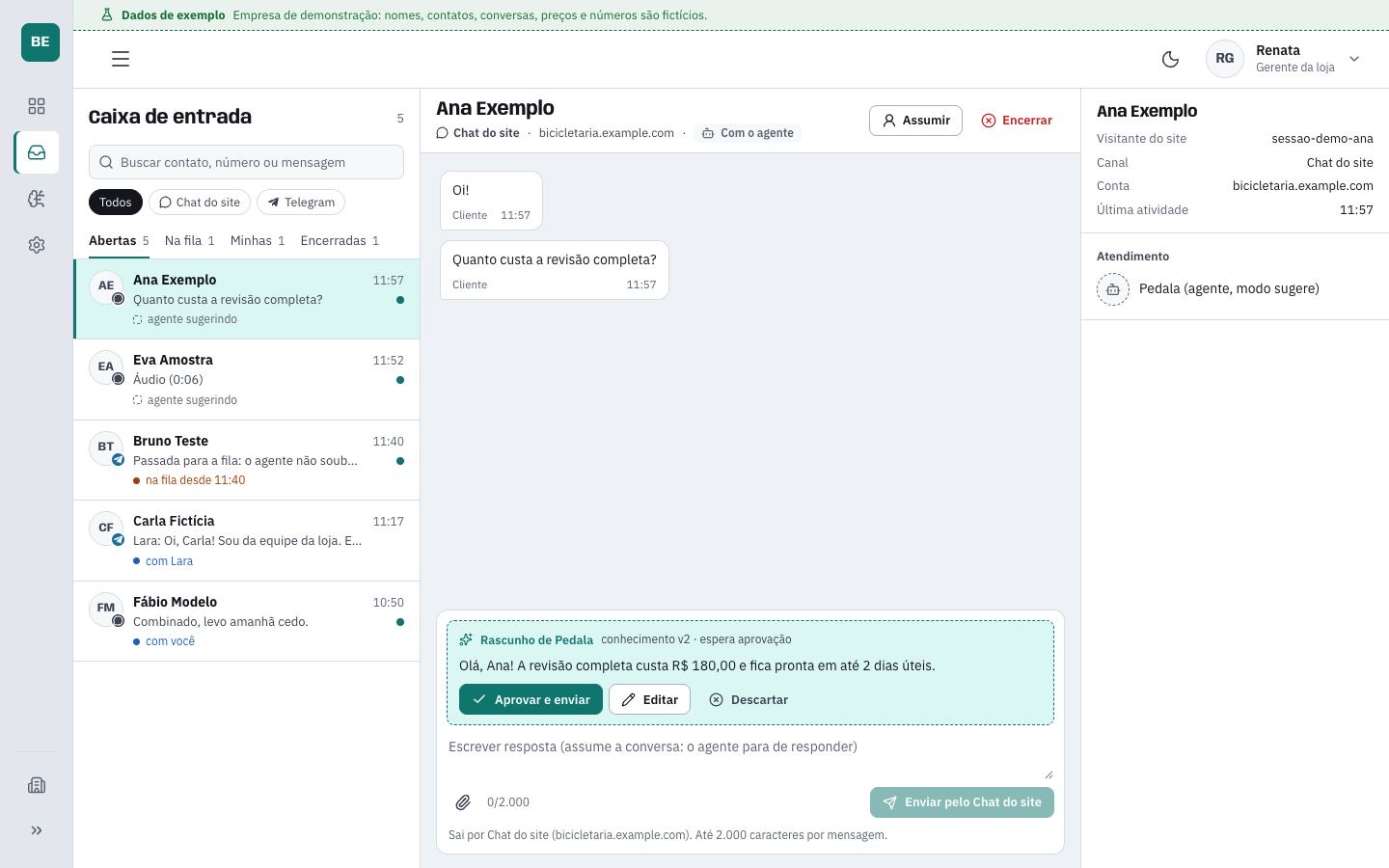
INBOX · demo company
central · sample dataCentral inbox: on the left, conversations from every channel; in the middle, the customer’s question and the AI-written reply waiting for approval; on the right, the contact details.

When the company WhatsApp lives on someone’s phone, the conversation leaves with that person, nobody knows who replied and the customer is left waiting. In the Central, the number belongs to the business, every reply is logged and the queue shows who is waiting.

Who it is for

  • Businesses of 2 to 50 people that serve customers on WhatsApp with more than one person: clinics, real estate agencies, stores.
  • Anyone who wants AI replying without losing control of what it says.
  • Wholesalers and distributors that take orders on WhatsApp, with the exclusive version.

Not for

  • Anyone who handles customers alone, on a single phone.
  • Anyone who wants a bot that chats about anything. The AI only talks about the business, and WhatsApp does not allow the rest.
  • Anyone who wants the AI to quote prices or timelines the business did not teach it.

The AI, on a single switch.

An AI assistant replies within what the business taught it. The business chooses the mode: off, only suggest replies for a person to approve, or reply on its own, handing the conversation to a person when the subject goes beyond what it was taught.

AI mode · pick one

Example · fictional data

How much is the full tune-up?Customer · 11:57

In the team queue

Hi, Ana! The full tune-up is R$ 180.00.Renata, from the team · 11:59

The AI does nothing. Every conversation goes to the queue, and a person on the team replies.

How much is the full tune-up?Customer · 11:57

AI reply · waiting for approval

Hi, Ana! The full tune-up is R$ 180.00 and is ready within 2 business days.

The AI writes the reply. A person approves, edits or discards it before it goes out.

How much is the full tune-up?Customer · 11:57

Hi, Ana! The full tune-up is R$ 180.00 and is ready within 2 business days.AI · sent 11:57

Do you pick up the bike from home?Customer · 11:58

Handed to the team: the shop did not teach this

The AI sends on its own, within what the business taught it, and hands the conversation to a person when the subject goes off track.

How it learns

  • Through a questionnaire: hours, address, services and prices, frequent questions, off-limits subjects and when to call a person.
  • Every change becomes a new version of what it knows.
  • The business tests it in a simulated conversation before turning it on.

What it never does

  • Make up prices or timelines. It only answers with what the business taught it.
  • Talk about subjects that are not the business’s.
  • Push on when it does not know. It hands the conversation to a person.
  • Go over the monthly limit. From then on, conversations go to the team.

What you get

  • One inbox for official WhatsApp, website chat and Telegram, with the whole team.
  • Open, queued, mine and closed, with search and a filter by channel.
  • Take over, hand back to the AI or close any conversation.
  • The AI taught by questionnaire, with versions and a simulator.
  • Team roles: administrator, manager and agent.
  • Overview: what is with the AI, in the queue and with each person, and the month’s usage.
  • A log of who answered each message, with which version of what was taught and at what cost.
  • The WhatsApp number and account stay in the business’s name.

Real work · the Central dashboard

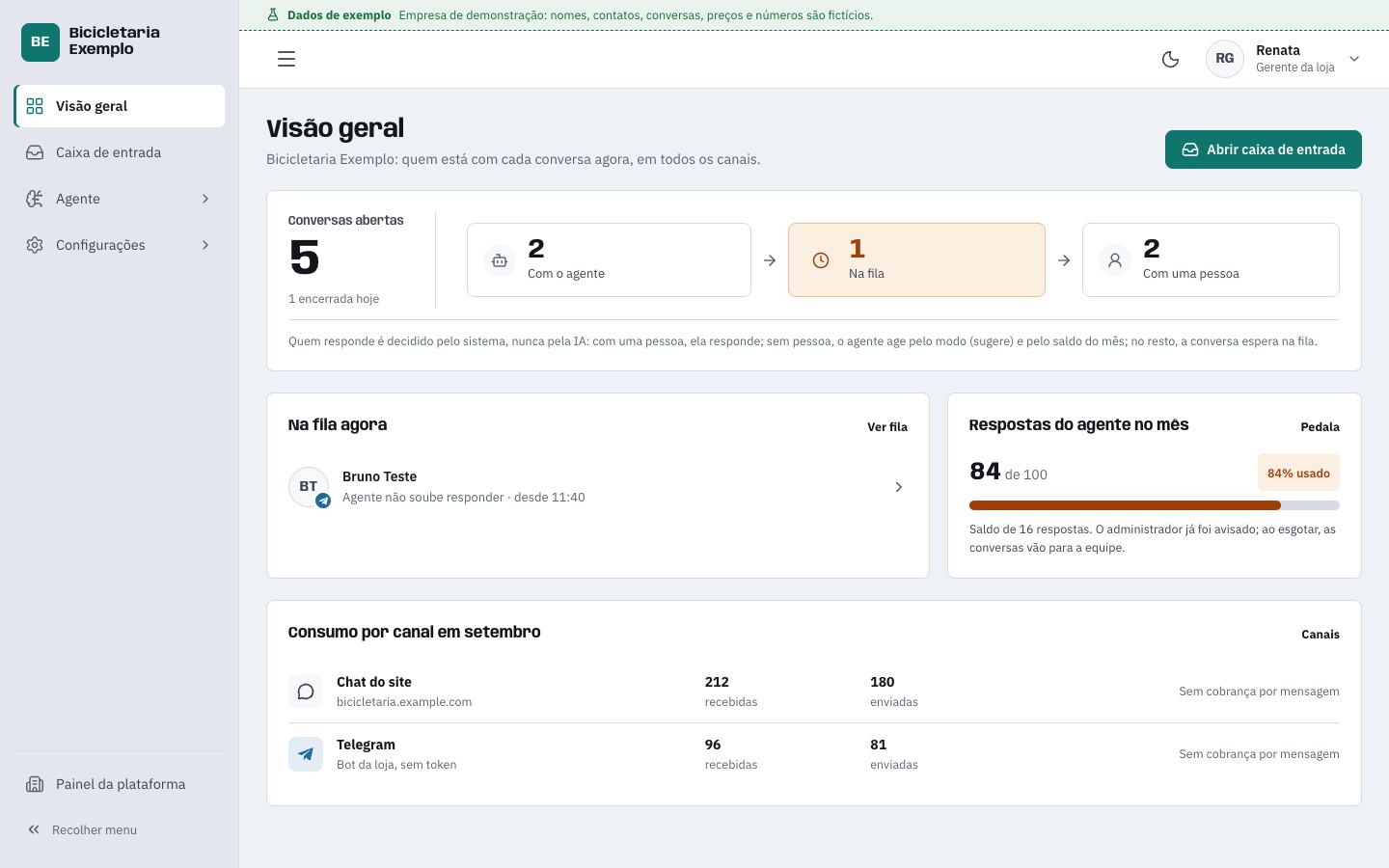
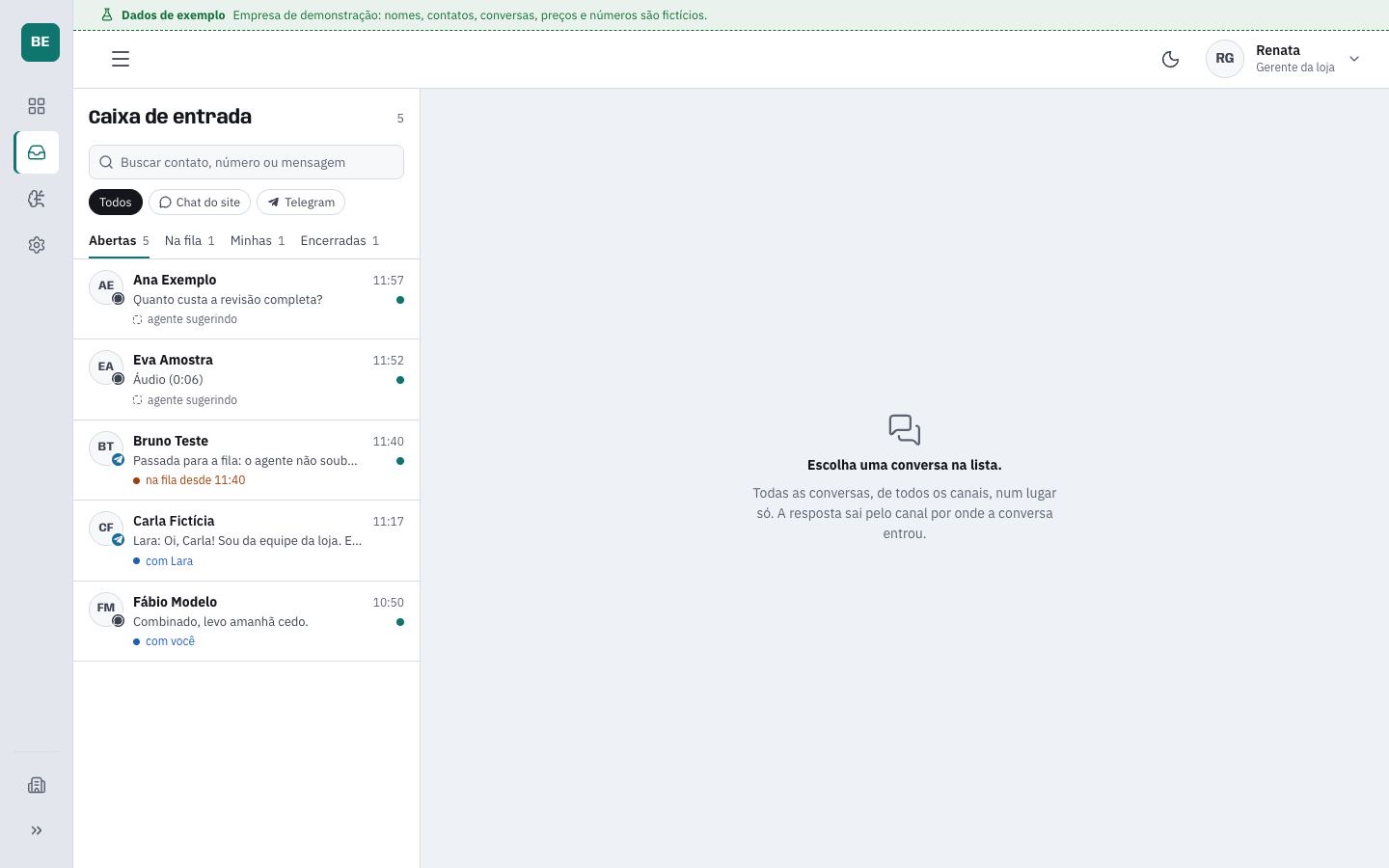
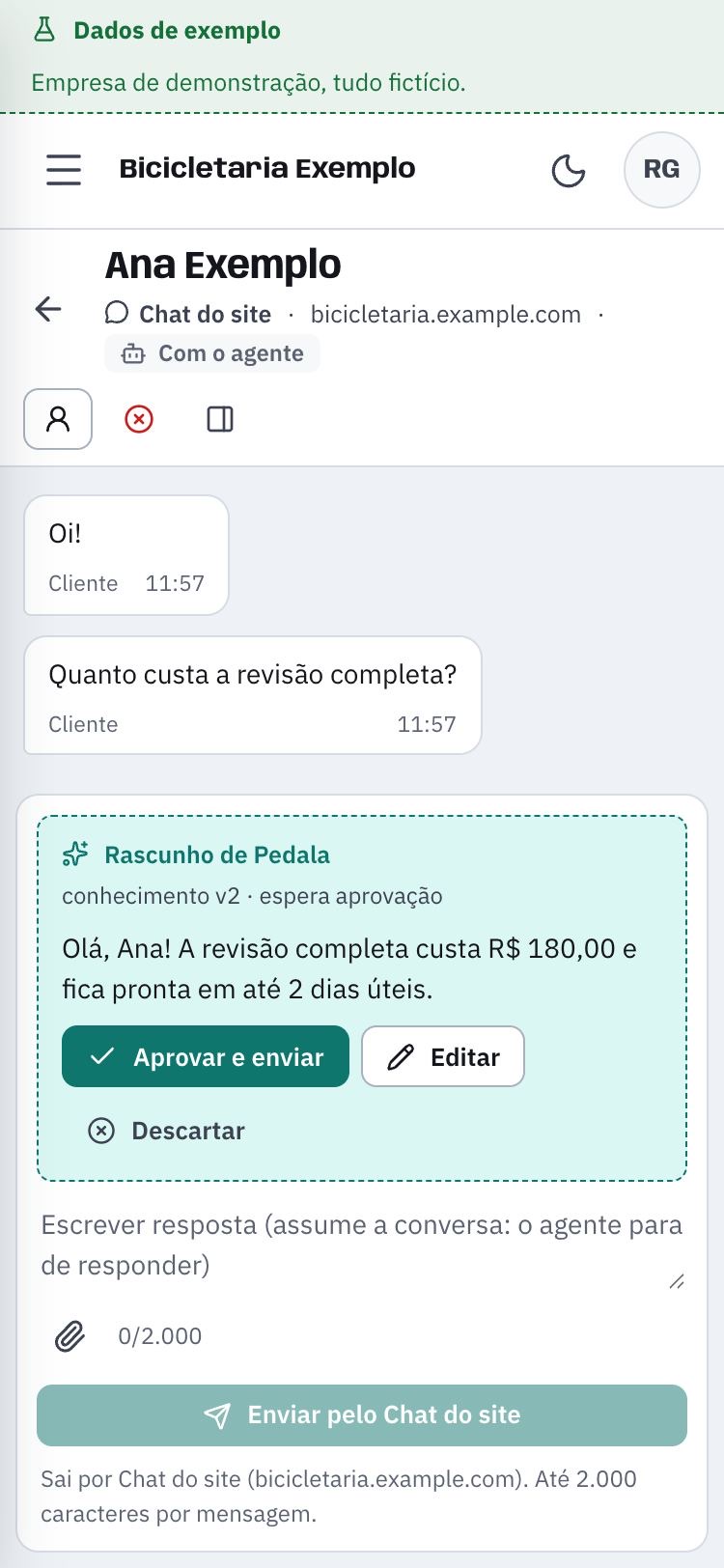
The dashboard, working.

Dashboard screens with a demo company, Bicicletaria Exemplo (a sample bike shop). Names, conversations and numbers are fictional.

Overview: open conversations split between the AI, the queue and the people on the team; who is in the queue now; AI replies this month against the limit; usage by channel.
Overview · with the AI, in the queue, with a person, and the month’s usage
Inbox: conversations from every channel in one list, with search, channel filters and the open, queued, mine and closed tabs.
Inbox · every channel, filters and search
Conversation on a phone: the customer’s question and the AI reply with the approve and send, edit and discard buttons.
On the phone · approving the AI reply

How it works.

You approve before each step moves on.

01

You tell us on WhatsApp how the business handles customers today: channels, team and what people ask most.

02

The business connects its own number through Meta’s official sign-up and keeps ownership of it.

03

It fills in the questionnaire that teaches the AI and tests it in the simulator.

04

It adds the team, picks the AI mode and starts serving customers.

Two versions.

The same Central. The difference is how much of the business’s process goes into it.

Open Central

For businesses of 2 to 50 people that serve customers on WhatsApp with more than one person.

Everything on this page, the same for everyone: inbox, the three AI modes, team roles and the log.

The whole team works on the same number. After hours, the AI can stay in reply mode.

Exclusive Central

For wholesalers and distributors that take orders on WhatsApp.

The business’s own process goes into the system: the order arrives as text, voice message or a photo of the list, is checked against stock, approved and sent to the management system (ERP).

Set up by Rodrigo Lima Pro. First the case review, then the proposal.

Questions that always come up.

Does the AI reply on its own?
Only if the business turns on reply mode. The default is off. In suggest mode, it writes and a person approves, edits or discards before it goes out.
And when it does not know the answer?
It hands the conversation to a person on the team, and the conversation goes into the queue.
Does the number stay with the business?
Yes. The business connects through Meta’s official sign-up and keeps ownership of the number and the WhatsApp Business account.
Can we write to a customer who stopped replying?
On WhatsApp, 24 hours after the customer’s last message, only a Meta-approved message template can be sent. The Central reads and creates these templates in the business’s account.
Can another business see our conversations?
Never. The separation is built into the database itself. We do not sell data or use it for advertising. The details are in the privacy policy, in the footer.
How much does it cost?
Prices for both versions are being finalized and will be on this page. Until then, tell us how the business handles customers and we send the proposal.
When does it start?
The Central opens to the first businesses when Meta approves number connection. Those who talk to us before are among the first.

A conversation takes five minutes.

Tell us what is scattered. We tell you what can be brought together, and what it costs.

Optional. It goes with your first message.

Film · Conexão
CONEXÃO, the studio’s film. Made with AI, no camera.
  1. You tell us what is scattered: Instagram, Google, website, WhatsApp.
  2. We tell you what can be brought together and what it costs, at the price on the page.
  3. You approve before anything is produced.